Apple One and Apple Music price (October 2026) and how to cancel
In the US (as of 2026-10-18), Apple lists Apple One at $21.95/month (Individual), $27.95 (Family) and $39.95 (Premier) (Apple One) and Apple Music at $11.99/month (Individual), $19.99 (Family) and $6.99 (Student) (Apple Music) - US list prices before tax. To cancel Apple One or Apple Music on an iPhone, open Settings, tap your name, tap Subscriptions, tap the subscription and tap Cancel Subscription, at least a day before your renewal date (Apple Support: Cancel a subscription from Apple).
You keep access until the end of the billing cycle you paid for. When you cancel Apple One, Apple lets you pick individual subscriptions to keep, billed separately.
Apple One is the one subscription where cancelling can remove several things at once: music, Apple TV, Arcade, iCloud+ storage and more. Before you cancel, decide which pieces you still want - Apple lets you keep them individually during the cancellation.
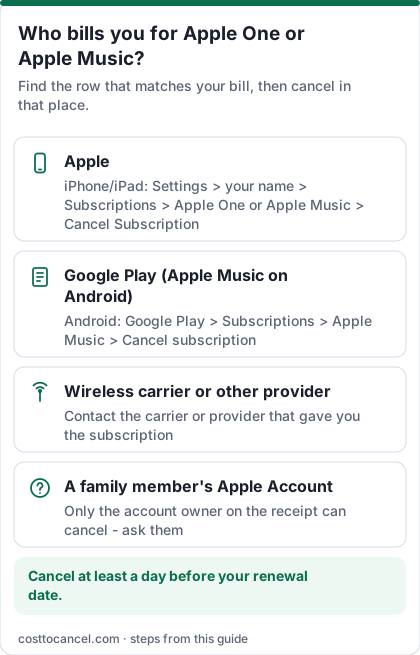
Where to cancel (who bills you)
| Who bills you | Where to cancel | Official help |
|---|---|---|
| Apple (most people) | iPhone/iPad Settings > your name > Subscriptions; Mac App Store; Apple Music or Apple TV app on Windows; or account.apple.com | Apple: Cancel a subscription from Apple |
| Google Play (Apple Music on Android) | If Google Play bills you, cancel in the Google Play app: Subscriptions > Apple Music > Cancel subscription | Apple: Cancel on Android · Google Play Help |
| Wireless carrier or other provider | Contact the carrier or provider that gave you the subscription | Apple: subscriptions through a carrier |
| A family member's Apple Account | Only the person whose Apple Account is on the receipt can cancel it - ask them | Apple: If you can't find the subscription |
Apple One and Apple Music US prices (verified October 2026)
| Plan | Price (US) | What you get |
|---|---|---|
| Apple One Individual | $21.95/mo | Bundle of Apple services for one person |
| Apple One Family | $27.95/mo | Share with up to five other people |
| Apple One Premier | $39.95/mo | Largest Apple One plan; share with up to five other people |
| Apple Music Individual | $11.99/mo | After the free trial |
| Apple Music Family | $19.99/mo | Share with up to five people |
| Apple Music Student | $6.99/mo | Verified students, up to four years |
How to cancel Apple One or Apple Music
iPhone or iPad
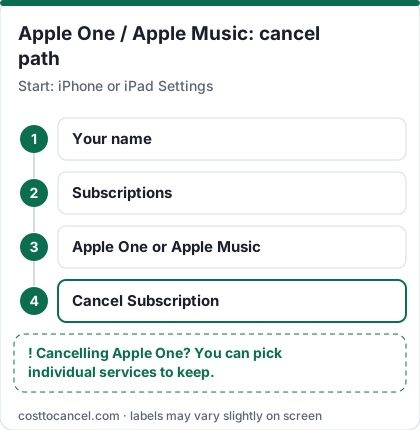
- Open Settings and tap your name.
- Tap Subscriptions.
- Tap Apple One or Apple Music.
- Tap Cancel Subscription (scroll down if needed). No Cancel button, or an expiration message in red, means it's already cancelled.
Mac
- Open the App Store and click your name at the bottom of the sidebar (or sign in).
- Click your name again on the page that appears.
- Click Subscriptions, click the subscription, then Cancel Subscription.
Windows PC
- Open the Apple Music or Apple TV app and click your name at the bottom of the sidebar, then View My Account.
- In Settings, next to Subscriptions, click Manage.
- Click Edit next to the subscription, then Cancel Subscription.
Android
- If Google Play bills you, cancel in the Google Play app (see the Google Play row above).
- If Apple bills you, go to account.apple.com and follow the onscreen instructions.
How to know it worked
You're done when:
- The subscription in Subscriptions shows an expiration message (in red) instead of a renewal date, or no longer shows a Cancel button.
- If you cancelled Apple One and chose services to keep, those appear as separate subscriptions with their own price.
- No renewal charge arrives after the end of the billing cycle.
If it didn't work
- The subscription isn't in your list. Search your email for "receipt from Apple" or "invoice from Apple" and sign in with the Apple Account on that receipt.
- A family member's account is on the receipt. You can't cancel a family member's subscription; ask them to cancel it.
- No Apple receipt at all. Another company probably bills you (for example a wireless carrier). Check your bank statement and contact that company.
- You were charged for a renewal you didn't want. Request a refund at reportaproblem.apple.com: I'd like to > Request a refund, choose a reason, then the subscription. Apple says to expect an update in 24 to 48 hours (Apple: Request a refund).
- A free trial renewed. Apple says to cancel a trial at least 24 hours before it ends.
What we verified
Verified on official Apple pages (October 18, 2026): Apple One and Apple Music US prices; Apple One being monthly with no long-term commitment; cancelling at least a day before renewal and keeping access to the end of the cycle; choosing individual subscriptions to keep when you cancel Apple One; cancel paths on iPhone, iPad, Mac, Windows and Android; carrier and family-member cases; the refund request steps and the 24-48 hour update.
Not verified - left out: price-increase dates and history (the old version of this page cited news sites); the iCloud+ storage included in each Apple One tier and the free storage level after cancelling; competitor prices; playlist transfer tools.
Apple One or individual services?
| If you mainly use... | Compare |
|---|---|
| Apple Music only | Apple Music Individual ($11.99) vs Apple One Individual ($21.95) |
| Music for a household | Apple Music Family ($19.99) vs Apple One Family ($27.95) |
| Several Apple services across a family | Apple One Family or Premier |
Apple says that if you cancel Apple One, you can select individual subscriptions to keep and your content (such as Apple Music playlists and Apple TV queues) continues where you left off. Prices from Apple One and Apple Music.
Switching from Apple Music to Spotify (or back) without paying twice
- Cancel the old service first; you keep it until the end of the period you paid for, so start the new one on or after that date.
- Playlists don't move between services automatically. Note or export the ones you care about before access ends.
- Check who bills you on both sides (Apple, Google Play, a partner) before you cancel. See Spotify Premium price and how to cancel.
Refunds
Apple doesn't promise refunds for partial months, but you can request one for a charge at reportaproblem.apple.com (Apple: Request a refund). Eligibility can vary by country or region. Charges billed by Google Play or a carrier go through those companies.
Frequently asked questions
Can I cancel Apple One but keep Apple Music?
Yes. Apple says that when you cancel Apple One you can select any individual subscriptions you'd like to keep, and you'll be billed separately for them.
Does Apple charge a fee to cancel Apple One?
No cancellation fee is mentioned. Apple One is a monthly subscription with no long-term commitment; cancel at least a day before your renewal date.
What happens to my Apple Music library?
Apple says your subscriptions continue where you left off if you move between Apple One and individual plans, without losing content like playlists. If you stop Apple Music entirely, catalog streaming ends when your paid period does.
Why don't I see the subscription in my list?
You may be signed in with a different Apple Account, a family member may own it, or another company (such as a wireless carrier) bills you.