No cancel button on a subscription? What to do next
In the US (as of 2026-10-18), a missing Cancel button usually means the plan is already canceled, you are on the wrong account, or a different company bills you. On Apple: open Settings → your name → Subscriptions → the plan; if there is no Cancel button or you see red expiration text, Apple says the subscription is already canceled (Apple Support: Cancel a subscription). If the plan is not listed at all, search email for “receipt from Apple,” match the Apple Account on the receipt, or cancel with the company on your bank statement (Apple Support: Cancel a subscription).
On Google Play, switch Google Accounts until Subscriptions shows the plan, then Cancel subscription (Google Play Help: Fix problems with subscriptions). Purchases Apple did not bill must be canceled with the developer or merchant (Apple Support: purchases not billed through Apple).
Deleting the app never cancels store billing. Match the statement line (APPLE.COM/BILL, GOOGLE on the statement, or the company name) before you hunt for a Cancel button inside the app.
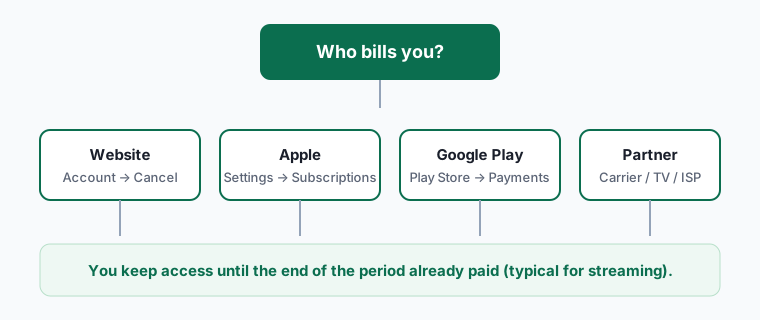
Where to cancel (who bills you)
| Who bills you | Where to cancel | Official help |
|---|---|---|
| Apple (APPLE.COM/BILL) | Settings → your name → Subscriptions → plan → Cancel Subscription (scroll; no button / red expiration = already canceled) | Apple Support |
| Google Play (GOOGLE on statement) | Play → Payments & subscriptions → Subscriptions → plan → Cancel subscription (try every Google Account) | Google Play Help; Fix missing subscriptions |
| Merchant / external purchase (company name on statement) | Sign in on the company’s site → account / billing → cancel; Apple cannot manage these | Apple Support: not billed through Apple |
| Wireless carrier / other provider | Contact the carrier or provider that sells the plan | Apple Support |
What to do when Cancel is missing
Read the statement first
- Open the bank or card charge and note the descriptor: APPLE.COM/BILL, GOOGLE, or a company name.
- Cancel only on the platform that matches that line—not inside an unrelated app menu.
If Apple bills you but Cancel is missing
- Open Settings → your name → Subscriptions → the plan.
- Scroll for Cancel Subscription. Apple Support: if there is no Cancel button or you see an expiration message in red text, the subscription is already canceled (Apple Support).
- If the plan is not listed, search email for “receipt from Apple” or “invoice from Apple,” note the Apple Account on the receipt, and sign in with that account (or ask the family member on the receipt to cancel).
- If there is no Apple receipt, Apple Support says you may have bought from another company—check the statement and contact that company (Apple Support).
If Google Play bills you but the plan is missing
- In the Play Store, switch Google Accounts (profile → account switcher) until Subscriptions shows the plan (Google Play Help).
- Open the plan → Cancel subscription and follow the prompts (Google Play Help).
- Check family members’ accounts and email receipts if you still cannot find it (Google Play Help).
If the company name (not Apple/Google) is on the statement
- Cancel in that company’s website account / billing settings.
- Apple Support: for purchases not billed through the App Store or Apple In-App Purchase, contact the developer—Apple cannot cancel or refund those (Apple Support).
How to know it worked
You're done when:
- Apple shows red expiration text / no Cancel button, or Google Play / the merchant shows the plan ending on a date.
- The statement descriptor matches the platform you used to cancel.
- You have a screenshot or confirmation email.
Sources: Apple Support; Google Play Help.
If it didn't work
- Already canceled on Apple. No Cancel button or red expiration text means it will not renew (Apple Support).
- Wrong Apple or Google Account. Use the account on the receipt (Apple Support; Google Play Help).
- Looking for Cancel inside a merchant-billed app. External / website purchases cancel with the developer, not Apple Settings (Apple Support).
- Carrier-billed plan. Apple Support: contact the wireless carrier or provider (Apple Support).
- Only deleted the app. Store billing continues until you cancel in Subscriptions (Google Play Help).
What we verified
Verified on official Apple and Google Help (October 18, 2026): no Cancel / red expiration = already canceled; receipt / family / other-account / no-Apple-receipt → contact company; carrier path on HT118428; purchases Apple cannot cancel on HT118126; missing Play subscriptions and uninstall-still-billed on answer/9818348; Play cancel path on answer/7018481.
Not verified - left out: brand retention-offer scripts; inventing partner menu labels beyond Apple/Google Help; claiming every merchant keeps access after cancel.
Identify an APPLE.COM/BILL charge
Sign in at reportaproblem.apple.com to see what Apple charged, then cancel unwanted subscriptions (Apple Support: apple.com/bill; Get help with apple.com/bill).
Related guides
Device steps: cancel iPhone subscriptions. Play steps: cancel Google Play subscriptions. If a charge already posted: still charged after cancel and get a refund.
Frequently asked questions
Does no Cancel button mean Apple is broken?
Usually not. Apple Support: if there is no Cancel button or you see red expiration text, the subscription is already canceled.
Why isn’t Netflix / Disney+ in Apple Subscriptions?
You may be billed by the streaming company or another partner. Check the statement descriptor and cancel with that biller; Apple Support covers the “no Apple receipt → contact the company” case.
Can Apple cancel a purchase I made on a company’s website?
No. Apple Support says purchases not billed through the App Store or Apple In-App Purchase must go to the developer (HT118126).
Does uninstalling cancel Google Play billing?
No. Google Play Help: if you uninstalled the app, you still need to cancel the subscription or you will continue to be charged.