Still charged after canceling a subscription? Check these steps
In the US (as of 2026-10-18), a charge after “cancel” is usually the current billing period, a second account, or a cancel that never reached the real biller. Confirm who billed you (APPLE.COM/BILL, GOOGLE on the statement, or a company name), then open that platform’s subscription list and confirm the plan shows an end/expiration date—not Renews. (Apple Support: Cancel a subscription; Google Play Help). If Apple billed you and you want the money back, sign in at reportaproblem.apple.com → Request a refund (Apple Support: Request a refund). If Google Play billed you, use Google’s refund request flow; after 48 hours Google says to contact the developer (Request a refund on Google Play).
You often keep access until the period you already paid for ends. That is not the same as a failed cancel.
Uninstalling an app does not cancel Apple or Google Play billing. Finish cancel on the store that owns the charge, then use that store’s refund path if a renewal you did not want already posted.
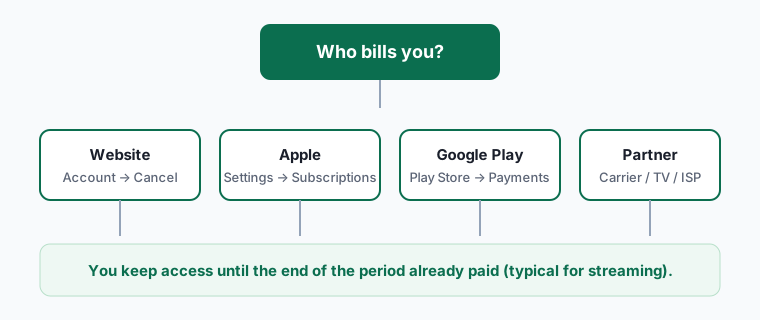
Where to cancel (who bills you)
| Who bills you | Where to cancel | Official help |
|---|---|---|
| Apple (APPLE.COM/BILL) | Settings → Subscriptions: confirm expiration / no Cancel; then reportaproblem.apple.com for refunds | Cancel; Refund; apple.com/bill help |
| Google Play (GOOGLE on statement) | Play Subscriptions → confirm canceled; Order history / refund self-help if a charge posted | Cancel; Fix problems; Request a refund |
| Merchant website (company name) | Confirm cancel in the merchant account; refunds go through that company’s support—not Apple/Google | Apple: not billed through Apple |
How to stop the next charge and recover the last one
Prove what the charge is
- Match the statement line to Apple, Google Play, or a merchant name (Apple Support: apple.com/bill).
- For Apple, open reportaproblem.apple.com and expand the purchase date—multiple items can share one charge (Apple Support).
- For Google, check pay.google.com / Play order history while signed into every Google Account you use (Google Play Help).
Confirm cancel actually landed
- Apple: Settings → Subscriptions → the plan. Red expiration text or no Cancel button = already canceled (Apple Support).
- Google Play: Subscriptions → status shows canceled / ending; if missing, switch accounts (Google Play Help).
- If the plan still says it renews, cancel now on that screen—do not only delete the app.
Ask for a refund on the same biller
- Apple: reportaproblem.apple.com → I’d like to → Request a refund → submit; wait 24–48 hours for an update (Apple Support).
- Google Play: use Request a refund; after 48 hours Google Play Help says to contact the app developer (Refund policies for apps/IAP/subscriptions).
- Merchant charges: contact that company’s support with the date and amount.
How to know it worked
You're done when:
- The store or merchant page shows the plan ending (will not renew).
- Any unwanted charge has a refund request submitted on the same biller.
- You understand whether the last charge was for the current paid period (access until that date) or a true unwanted renewal.
Sources: Apple Support; Apple refund; Google Play refund.
If it didn't work
- Charge for the period you already paid. Many stores keep access until period end after cancel; that charge is not proof cancel failed (Google Play Help: cancel).
- Canceled on the wrong account. Try every Apple / Google Account on the receipts (Apple Support; Google Play Help).
- Only uninstalled the app. Google Play Help: you will continue to be charged until you cancel in Subscriptions (answer/9818348).
- Apple trial converted. Apple Support: cancel a trial at least 24 hours before it ends if you do not want it to renew (Apple Support).
- Asked Apple to refund a merchant charge. Apple cannot help purchases it did not bill (HT118126).
- Pending Apple charge. Apple Support: wait for the email receipt before requesting a refund (Apple Support).
What we verified
Verified on official Apple and Google Help (October 18, 2026): already-canceled signals and trial 24-hour note on HT118428; apple.com/bill identification on HT108092 and HT120164; Report a Problem refund steps and pending-charge note on HT118223; Play uninstall-still-billed and wrong-account guidance on answer/9818348; Play refund path and developer-after-48h on answer/15574897 and answer/15574908; Apple cannot cancel/refund non-Apple billing on HT118126.
Not verified - left out: guaranteeing bank chargebacks; brand-specific refund windows (Amazon/Adobe/etc.) without citing each brand here; claiming every cancel is mid-cycle refundable.
Family Sharing and shared cards
Apple Support: Family organizers can review family purchases in Report a Problem; the family member whose Apple Account purchased a subscription must cancel it (Refund; Cancel). Google Play Help also points you to check family members when a subscription is missing (Fix problems).
Related guides
No cancel button · Get a subscription refund · Cancel iPhone subscriptions · Free trial tips.
Frequently asked questions
I canceled—why do I still have access and a recent charge?
Many platforms keep access until the end of the period you already paid for. Check whether the store shows an end date rather than Renews.
How do I see what APPLE.COM/BILL was for?
Sign in at reportaproblem.apple.com and open the purchase date for the full receipt (Apple Support).
Google Play refund after 48 hours?
Google Play Help: contact the app developer about a refund (Request a refund).
Are refunds guaranteed?
No. Follow the official Apple or Google Play flow; decisions depend on their policies and the purchase details.