Discord Nitro price (October 2026) and how to cancel Nitro or Nitro Basic
In the US (as of 2026-10-18), Discord's official Nitro page lists Nitro Basic at $2.99/month (50 MB uploads), and Discord's own Help Center states full Nitro renews at $9.99/month after partner trials (T-Mobile Nitro FAQ); Discord's May 2026 Nitro guide also lists Nitro at $9.99/month or $99.99/year and Basic at $2.99/month or $29.99/year. To cancel on desktop or the web, open User Settings (the cog next to your username) > Subscriptions and click Cancel in the Nitro or Nitro Basic banner; on mobile, tap your avatar > cog > Billing Settings > Manage Nitro - and cancel on the same type of device you bought it on (Discord Support: How to Cancel your Nitro Subscription).
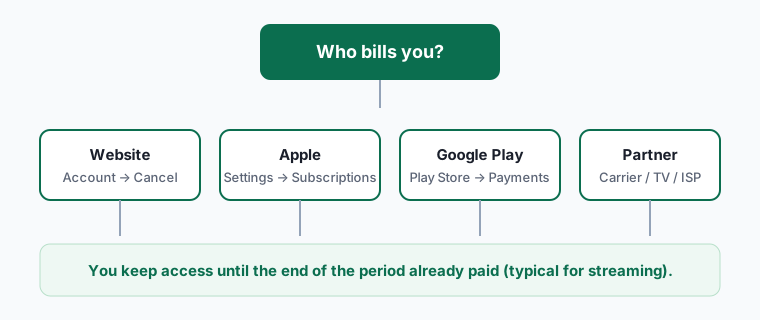
Perks stay active until the end of the period you paid for. Nitro bought through the App Store must be cancelled in iPhone Settings > Subscriptions.
Nitro is Discord's paid tier, and it touches more than your own account: the two server boosts that come with full Nitro power up servers you've chosen to support. That's the part people forget when they cancel - and why the server you moderate may suddenly lose its custom emoji slots or audio quality the day after your renewal date.
Discord Nitro plans (October 2026)
| Plan | Price (US) | What you get |
|---|---|---|
| Nitro Basic (monthly) | $2.99/mo | 50 MB uploads, custom emoji anywhere, custom app icons |
| Nitro Basic (yearly) | $29.99/yr | Same Basic perks, paid upfront |
| Nitro (monthly) | $9.99/mo | 1 GB uploads, HD video streaming, custom profiles, 2 server boosts, Xbox Game Pass perk in select regions |
| Nitro (yearly) | $99.99/yr | Same Nitro perks, paid upfront |
| Extra server boosts | Per boost, per month - shown at checkout | Billed separately from Nitro |
| Bought in the iPhone / Android app | Price shown in the store | Cancel through Apple or Google |
Cancel Nitro on each platform
Discord's help center says a subscription must be cancelled on the same type of device where you bought it: bought on desktop or browser, cancel there; bought on a phone, cancel on a phone.
Desktop app or discord.com
- Click the cog next to your username at the bottom left to open User Settings.
- Open the Subscriptions tab.
- Click Cancel inside the Nitro or Nitro Basic banner.
- Follow the prompts, confirm, and note the end date Discord shows.
Discord mobile app (purchased on mobile)
- Tap your avatar in the bottom right.
- Tap the cog in the top right.
- Scroll to Billing Settings and tap Manage Nitro.
- Cancel and follow the prompts until the cancellation is confirmed. On Android, Discord hands you to Google Play to confirm.
iPhone or iPad (App Store billing)
- Open Settings on your iPhone or iPad and tap your name at the top.
- Tap Subscriptions.
- Tap Discord.
- Tap Cancel Subscription (or Cancel Free Trial), then confirm.
- Deleting the Discord app doesn't stop the subscription.
Stop paid server boosts too
- In User Settings > Subscriptions, scroll to Server Boost.
- Open the ... menu next to each paid boost and choose Cancel Boost Subscription.
- The two boosts included with Nitro end automatically with Nitro - you don't cancel those separately.
What changes when Nitro ends
| Feature | Nitro | Nitro Basic | Free (after cancelling) |
|---|---|---|---|
| File uploads | Up to 1 GB | Up to 50 MB | Back to the free limit |
| Custom emoji in any server | Yes | Yes | Only in the server that owns them |
| HD video streaming | Yes | No | No |
| Animated avatar, banner, profile themes | Yes | No | Removed - reverts to a static avatar |
| Included server boosts | Yes | No | Removed from the servers you boosted |
| Super Reactions, Nitro friend passes | Yes | Limited or no | No |
| Messages, servers, friends, files already sent | Kept | Kept | Kept |
Nothing you've already sent is deleted. What disappears is the ability to send big files, use other servers' emoji and keep paid profile cosmetics.
Our take: tell your server before your boosts vanish
If you've been boosting a community server with the boosts that come with Nitro, cancelling quietly can drop that server a boost level - fewer emoji and sticker slots, lower audio quality and the loss of a custom invite link at higher levels. Server admins see the drop, not the reason.
A one-line heads-up in the server a week before your end date gives others a chance to pick up the boosts. If the server matters to you but Nitro doesn't, you can also keep a single paid boost going without full Nitro.
Nitro Basic or nothing?
At $2.99 a month, Nitro Basic exists for people who mostly want custom emoji everywhere and a bigger upload limit. Ask yourself one question: how often in the last month did you hit the upload limit or reach for another server's emoji? If the answer is "rarely", free Discord is fine; if you share clips or files daily, Basic is the cheaper middle ground, and switching from Nitro to Basic in Subscriptions > Switch plans usually applies from your next billing date.
Full Nitro makes sense mainly if you stream in HD, boost servers, or use the Xbox Game Pass perk Discord advertises in select regions - check that perk's terms on Discord's page, because availability varies by country.
Refunds and surprise renewals
Discord's paid services terms let you request a refund for some recent charges - for example a renewal you didn't intend and haven't used. Request it through Discord support from the account that paid, soon after the charge. Nitro bought through Apple or Google must be refunded by them; our subscription refund guide explains the Apple and Google request pages. A free trial that turns into a paid month is the most common surprise - our free trial tips cover how to cancel on day one and still keep the trial.
Gifted Nitro and gift codes
If someone gifted you Nitro, there's usually nothing to cancel: the gift runs for its set length and stops. If you have Nitro on your own card and redeem a gift, Discord applies the gift time to your account - check Subscriptions afterwards to confirm when paid billing resumes. To stop paying entirely, cancel the paid subscription; gift time you already redeemed isn't lost.
Frequently asked questions
How much is Discord Nitro Basic?
Discord's official Nitro page lists Nitro Basic at $2.99 per month; Discord's May 2026 Nitro guide also lists $29.99 per year (US, as of 2026-10-18).
How much is full Discord Nitro?
Discord Support states the standard renewing price as $9.99 per month (US). Discord's May 2026 Nitro guide also lists $99.99 per year. Confirm the amount in User Settings > Subscriptions.
Does uninstalling Discord cancel Nitro?
No. Cancel in User Settings > Subscriptions, or in the App Store or Google Play if they bill you.
What happens to my servers when Nitro ends?
You stay in all your servers. Only the boosts included with Nitro are removed, which can lower a server's boost level.
Can I cancel a Nitro free trial and keep it until the end?
Usually yes - cancel during the trial and the perks continue until the trial end date shown in Subscriptions.
Why can't I find the Cancel button?
You're probably on a different type of device from the one you bought Nitro on. Discord requires cancelling on the same device type - or, for App Store purchases, in iPhone Settings > Subscriptions. If you can't access your account at all, Discord's cancel article links a billing support form.