How to cancel SiriusXM (October 2026): online, in the app or by chat
In the US (as of 2026-10-18), SiriusXM's official plans page lists new-subscriber offers of $1 for 3 months, then $11.99/month or $25.99/month depending on the plan (US list prices, before SiriusXM's added fees). To cancel SiriusXM, sign in to the SiriusXM Online Account Center, open the Subscriptions tab, select Manage next to your plan and choose Cancel Subscription, at least 24 hours before your renewal date (SiriusXM Help: Manage or Cancel Service).
Live chat works too. Streaming plans bought through Apple or Google are cancelled in iPhone Settings > Subscriptions or Google Play > Subscriptions, and SiriusXM's customer agreement says uninstalling the app or selling or trading in your car does not cancel a subscription.
SiriusXM has a reputation for being hard to leave, mostly because it used to push everyone to the phone. That has changed: SiriusXM's help page now lists online cancellation in the Online Account Center, with live chat and phone as alternatives. What still trips people up is the car radio. A satellite subscription is tied to the radio ID in a specific vehicle, not to you, and SiriusXM's customer agreement states that selling or trading in your vehicle does not cancel your subscription.
What SiriusXM charges after the intro offer (October 2026)
| Plan | Price (US) | What you get |
|---|---|---|
| Intro offer (new subscribers) | $1 for 3 months | Auto-renews to the plan's regular monthly price |
| Lower-priced plan listed on siriusxm.com/plans | $11.99/mo after intro | Plan name and channel lineup: check the official page |
| All Access-style plan ("everything we offer") | $25.99/mo after intro | Music, live sports play-by-play, news, talk, in-car and app |
| Streaming plans via Apple / Google | Shown in the store | Cancel in the App Store or Google Play, not on siriusxm.com |
Three ways to cancel SiriusXM
Before you start, find your radio ID (tune to channel 0 on the car radio, or look in the SiriusXM app account screen) and your account number from a bill. Both speed up chat and phone cancellations.
Online Account Center (fastest)
- Go to siriusxm.com and sign in to the Online Account Center.
- Open the Subscriptions tab.
- Select Manage next to the plan or radio you want to stop, then choose Cancel Subscription.
- Work through the offer screens - SiriusXM will usually show a discounted rate before confirming. Decline if you really want to leave.
- Save the confirmation number and email. Check the next statement to make sure no new charge appears.
- Timing: SiriusXM's help page warns that if you don't cancel more than 24 hours before your renewal date, the subscription might renew.
Live chat
- From the official Manage or Cancel Service help page, start a chat with an agent.
- Say clearly: "I want to cancel my subscription for radio ID ..." and give the radio ID.
- Ask for a confirmation number and a written confirmation by email before ending the chat.
Streaming subscription billed by Apple
- Open Settings on your iPhone or iPad and tap your name at the top.
- Tap Subscriptions.
- Tap SiriusXM.
- Tap Cancel Subscription (or Cancel Free Trial), then confirm.
Streaming subscription billed by Google Play
- Open the Google Play Store app and tap your profile icon (top right).
- Tap Payments & subscriptions > Subscriptions.
- Select SiriusXM.
- Tap Cancel subscription, pick a reason and confirm.
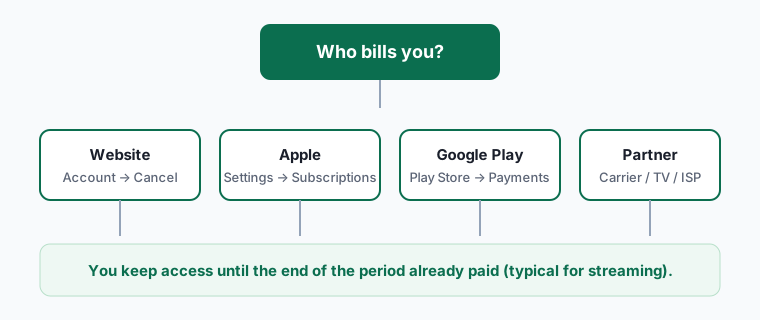
Who bills you decides where you cancel
SiriusXM subscriptions come from more places than most services, and each route has a different off switch.
| How you got SiriusXM | Who is billing you | Where to cancel |
|---|---|---|
| Signed up on siriusxm.com or by phone | SiriusXM | Online account, chat or phone |
| Free trial that came with a new or used car | Nobody yet - trial ends on its own | Nothing to cancel unless you entered a card to continue |
| Converted a car trial to paid | SiriusXM | Online account, chat or phone |
| Bought streaming in the iPhone app | Apple | iPhone Settings > your name > Subscriptions |
| Bought streaming in the Android app | Google Play | Play Store Payments & subscriptions |
| Bundled with a carmaker's connected-services plan | The carmaker | That carmaker's owner app or account |
Only use the iPhone steps if you subscribed through the App Store (the charge on your statement says APPLE.COM/BILL). Only use the Android steps if you pay through Google Play (the charge says GOOGLE *service name).
Our take: the car, not the person, is the trap
The single most expensive SiriusXM mistake we see is paying for a radio in a car you no longer own. Because the subscription follows the radio ID, a car you traded in can keep billing your card for months, and the dealer or new owner has no reason to tell you.
If you are selling or trading in a car, cancel or transfer that radio before you hand over the keys, and ask for the cancellation in writing. If you already sold it, cancel now and ask SiriusXM about the months since the sale date - have the bill of sale ready. Refunds for that period aren't promised, but the paperwork gives you the strongest case.
The second trap is the intro offer. $1 for three months is a good deal only if you note the renewal date the day you sign up. Put a reminder a week before it ends; on that day decide whether the regular monthly price shown on the plans page is worth it to you.
Retention offers: what to expect
When you try to cancel, SiriusXM often offers a lower monthly rate to stay. Treat it as a separate decision, not a hurdle:
- Accept only if the new price and its end date are stated in writing. Offers usually last a set number of months before reverting to the regular rate.
- Decline politely and repeat that you want to cancel. You don't need to give a reason.
- Fees still apply. The plan price on the website is before the music royalty and other fees SiriusXM adds, so compare the full amount on your bill, not the headline number.
Refunds and the final bill
SiriusXM's customer agreement generally doesn't refund the unused part of a monthly period after you cancel, and prepaid longer plans are handled according to the terms you accepted when you bought them. If you were billed after a cancellation you can document, or billed for a car you've sold, ask chat for a credit and keep the confirmation numbers.
If SiriusXM refuses and you believe the charge is wrong, our subscription refund guide explains how to dispute it with your card issuer. For Apple or Google billing, request refunds from them - SiriusXM can't refund store purchases.
If you still want music in the car
- Phone streaming through CarPlay or Android Auto covers most music needs - compare Spotify, Apple Music and Amazon Music Unlimited.
- Audiobooks for long drives: see Audible.
- Free FM radio and free podcast apps remain the cheapest option for news and talk.
Frequently asked questions
Can I cancel SiriusXM online?
Yes for most subscriptions billed directly by SiriusXM: sign in at siriusxm.com and use Manage subscription. If the option doesn't appear, use live chat.
How do I stop SiriusXM in a car I sold?
Cancel the subscription for that radio ID in your account or by chat - SiriusXM's customer agreement says selling or trading in a vehicle does not cancel it. Keep your bill of sale in case you ask for a credit for months after the sale.
How late can I cancel before renewal?
SiriusXM's help page says to cancel more than 24 hours before your renewal date, or the subscription might renew.
What happens after the $1 for 3 months offer?
It renews automatically at the plan's regular monthly price shown on SiriusXM's plans page, plus fees, unless you cancel first.
Do I lose access immediately?
Usually service stops at the end of the current billing period. The confirmation should state the end date.
I subscribed in the iPhone app - why can't SiriusXM cancel it?
Apple bills you, so only Apple's Subscriptions screen can stop it.