ESPN+ price (October 2026): ESPN Select vs Unlimited, and how to cancel
In the US (as of 2026-10-18), ESPN's official plans and prices page lists ESPN Select (formerly ESPN+) at $13.99/month or $139.99/year and ESPN Unlimited at $31.99/month or $319.99/year, while the Disney+, Hulu, ESPN Unlimited bundle starts at $35.99/month on plus.espn.com. To cancel, sign in at ESPN.com in a browser, open your profile picture > Account > Manage Subscription, select the plan under Plans & Billing and choose Cancel; access continues until the end of the billing cycle (ESPN Fan Support: Cancelling your ESPN Select or Unlimited subscription).
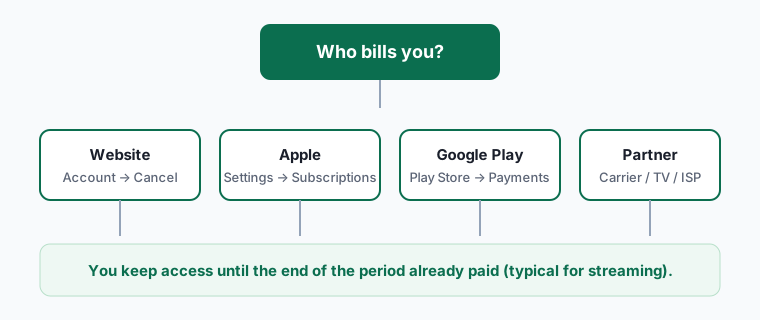
ESPN says it does not refund partially used billing periods. If Apple, Google, Roku, Disney+, Hulu or a TV provider bills you, cancel with them instead.
- ESPN streaming plans and prices (October 2026)
- How to cancel ESPN Select, ESPN Unlimited or the bundle
- Check this first: do you already have ESPN?
- Downgrade timing: our recommendation
- What you keep and lose
- Refunds and disputes
- Before a big game: a five-minute checklist
- Seasonal approach for sports fans
- FAQ
ESPN reorganised its streaming plans in 2025. Existing ESPN+ subscribers were converted to ESPN Select, which carries the same ESPN+ content. New buyers choose between Select and Unlimited, or get ESPN inside a Disney+ and Hulu bundle. On top of that, many cable, satellite and live-TV customers now get ESPN Unlimited at no extra charge through their provider - which means some people are paying for ESPN twice.
ESPN streaming plans and prices (October 2026)
| Plan | Price (US) | What you get |
|---|---|---|
| ESPN Select (formerly ESPN+) | $13.99/mo or $139.99/yr | ESPN+ content only: soccer, NHL, PGA TOUR, college sports, originals |
| ESPN Unlimited | $31.99/mo or $319.99/yr | All ESPN networks plus ESPN+ and NFL Network |
| Disney+, Hulu, ESPN Unlimited bundle | From $35.99/mo | Three services, each accessed separately |
| Bundle + NFL+ Premium | $41.99/mo | Adds NFL+ Premium (live local and primetime games on phones and tablets) |
| Via TV or live-TV provider | Included in eligible packages | Activate with a MyDisney login; ends if you leave that package |
How to cancel ESPN Select, ESPN Unlimited or the bundle
ESPN billed directly (espn.com in a browser)
- Sign in to your ESPN account at espn.com on a computer or mobile browser.
- Hover over (web) or tap (mobile browser) your profile picture in the upper right.
- Select Account under Manage My Account, then Manage Subscription.
- Click the subscription under Plans & Billing, pick the plan to cancel, select Cancel and confirm.
- Your ESPN account itself is not deleted - you can still use the free parts of the app after access ends.
ESPN inside a Disney+ / Hulu bundle
- Sign in at disneyplus.com > profile > Account.
- Under Subscription, select the bundle.
- Pick Change plan to drop ESPN but keep Disney+ and Hulu, or Cancel Subscription to end all three.
iPhone or iPad (App Store billing)
- Open Settings on your iPhone or iPad and tap your name at the top.
- Tap Subscriptions.
- Tap ESPN.
- Tap Cancel Subscription (or Cancel Free Trial), then confirm.
Android (Google Play billing)
- Open the Google Play Store app and tap your profile icon (top right).
- Tap Payments & subscriptions > Subscriptions.
- Select ESPN.
- Tap Cancel subscription, pick a reason and confirm.
Included with a TV provider
- There is no separate ESPN charge to cancel. ESPN access ends automatically if you cancel or switch out of the eligible TV package, under your provider's terms.
Check this first: do you already have ESPN?
ESPN's own FAQ says customers of Cox, DIRECTV, Fubo, Hulu + Live TV, Spectrum TV, U-verse, Verizon Fios, Xfinity and YouTube TV may get ESPN Unlimited through select plans at no extra charge. Use this matrix before you pay or cancel anything:
| Your situation | What you probably have | What to do |
|---|---|---|
| Pay ESPN directly and have one of those TV packages | Possibly ESPN twice | Activate the provider entitlement with your MyDisney login, confirm it works, then cancel the direct plan |
| Disney+, Hulu, ESPN bundle | ESPN Select or Unlimited inside the bundle | Change plan to drop ESPN, or keep the bundle if you watch all three |
| Only want soccer, NHL, golf or ESPN originals | ESPN Select is enough | Downgrade from Unlimited to Select |
| Want ESPN and ESPN2 live without cable | ESPN Unlimited or a live-TV service | Compare against YouTube TV or Hulu + Live TV |
| Bought MLB.TV and got a free ESPN Unlimited month | Trial that auto-renews at $31.99/month | Cancel ESPN before the month ends if you don't want it; MLB.TV keeps working |
Downgrade timing: our recommendation
ESPN's help text spells out an asymmetry worth using. Upgrading from Select to Unlimited takes effect immediately and is prorated. Downgrading to Select takes effect on your next billing date.
So if you only need Unlimited for one event or a few weeks of a season, schedule the downgrade right after you upgrade. You keep Unlimited for the rest of the cycle you paid for and drop back automatically, instead of trying to remember on the right day. The same logic works for full cancellation: cancel early in the cycle, keep watching until it ends.
What you keep and lose
| After you cancel | Keep? |
|---|---|
| Access until the end of the current billing cycle | Yes |
| Your ESPN / MyDisney account, fantasy teams, alerts | Yes - the free app still works |
| Refund for the unused part of the month or year | No - ESPN says it doesn't refund or credit partial periods |
| Pay-per-view events already bought | Still yours to watch; not refunded by cancelling |
| ESPN content in the Disney+ app | Ends with the ESPN plan or bundle |
| Annual plan switch to monthly mid-term | Not immediately - ESPN says you can't switch an annual plan to monthly right after being charged |
Refunds and disputes
Because ESPN states it won't refund partially used billing periods, the practical way to save money is timing rather than refund requests. Exceptions are billing errors: a charge after a confirmed cancellation, or double billing when your TV provider already includes ESPN. Raise those through ESPN's help chat with your confirmation. Store purchases are refunded by Apple or Google only - see how to get a subscription refund.
Before a big game: a five-minute checklist
Most ESPN sign-ups happen an hour before kickoff, which is exactly when people pick the wrong plan. Run through this first:
- Check your TV or live-TV provider in the list above. If ESPN Unlimited is included, activating it with your MyDisney login costs nothing extra.
- Check the channel, not the sport. A game on ESPN or ESPN2 needs Unlimited; a game streaming only on ESPN+ is covered by Select.
- Check blackouts. Local and national blackout rules still apply to some leagues, regardless of plan.
- Decide monthly or annual. ESPN notes that once you've been charged for an annual plan you can't immediately move to monthly billing on the same plan - choose monthly if you only care about one season.
- Set a reminder for the day after the event or season ends, so the cancellation in the steps above happens while you still remember.
Seasonal approach for sports fans
Sports subscriptions are the best candidates for rotating. Subscribe monthly when your league is in season, cancel after the last billing date you need, and resubscribe next season. Our streaming rotation guide explains how to stagger services so you are never paying for two at once, and the Disney+ bundle guide shows when the three-service bundle beats paying separately.
Frequently asked questions
Is ESPN+ going away?
No. ESPN says ESPN+ content continues in the ESPN Select plan and is also included in ESPN Unlimited and the Disney+, Hulu, ESPN bundles.
How much is ESPN+ (ESPN Select) now?
In the US as of 2026-10-18, ESPN lists ESPN Select at $13.99/month or $139.99/year, and ESPN Unlimited at $31.99/month or $319.99/year.
Does deleting my ESPN account cancel the subscription?
No. ESPN says deleting your account does not cancel an ESPN subscription - cancel first, then delete the account if you want to.
Can I cancel ESPN at any time?
Yes. You keep access until the end of the current billing cycle and aren't charged again.
How many devices can stream at once?
ESPN says up to three devices at the same time for most content.
Why is there no cancel button in my ESPN account?
You're billed by someone else - Disney+, Hulu, Apple, Google or a TV provider. Cancel there.