HBO Max price (October 2026) and how to cancel HBO Max
In the US (as of 2026-10-18), HBO Max costs $10.99/month or $109.99/year (Basic with Ads), $18.49/month or $184.99/year (Standard), and $22.99/month or $229.99/year (Premium) - yearly plans save 16% (HBO Max Help: plans and prices). To cancel when WarnerMedia bills you, go to HBOMax.com/subscription, choose Cancel Your Subscription, then confirm and note the expiration date (HBO Max Help: How do I cancel).
You can stream until the end of the billing period. Deleting the app does not cancel.
HBO Max Help's first step is always find who bills you on HBOMax.com/subscription (or Subscription in the app). The cancel button only appears for WarnerMedia-billed plans.
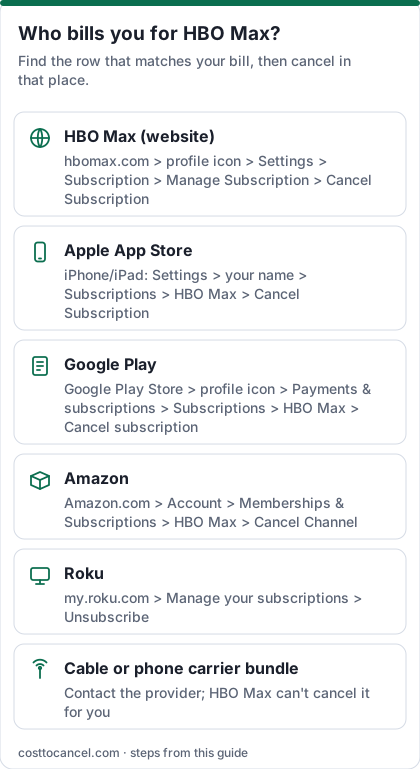
Where to cancel (who bills you)
| Who bills you | Where to cancel | Official help |
|---|---|---|
| WarnerMedia / HBO Max directly | HBOMax.com/subscription > Cancel Your Subscription > confirm | HBO Max Help |
| Apple | iPhone Settings > your name > Subscriptions > HBO Max > Cancel Subscription | HBO Max Help / Apple |
| Google Play | Play Store > profile > Payments & subscriptions > Subscriptions > HBO Max > Cancel subscription | HBO Max Help |
| Amazon (Appstore or Prime Video Channels) | Appstore: amazon.com/appstoresubscriptions and turn off auto-renew; Channels: Manage Your Prime Video Channels > HBO Max > Cancel Channel | HBO Max Help |
| Roku | my.roku.com/subscriptions > HBO Max > Manage subscription > turn off auto-renew | HBO Max Help |
| Cable, phone or other partner | Subscription page shows the provider - cancel with that provider (HBO Max cannot cancel it for you) | HBO Max Help |
HBO Max price tiers (October 2026)
| Plan | Price (US) | What you get |
|---|---|---|
| Basic with Ads | $10.99/mo or $109.99/yr | 1080p; 2 streams; ads |
| Standard | $18.49/mo or $184.99/yr | Ad-free; 2 streams; 30 downloads; Live Sports included |
| Premium | $22.99/mo or $229.99/yr | Ad-free; 4 streams; 4K and Dolby Atmos where available; 100 downloads; Live Sports included |
How to cancel HBO Max
Find who bills you
- Go to HBOMax.com/subscription (or Subscription in the app) and sign in.
- Read the billing provider shown at the top of the screen.
If WarnerMedia bills you
- On HBOMax.com/subscription, choose Cancel Your Subscription.
- Confirm and note the expiration date.
- You can stream until that date.
If Apple bills you
- Open Settings on your iPhone or iPad and tap your name at the top.
- Tap Subscriptions.
- Tap HBO Max.
- Tap Cancel Subscription (or Cancel Free Trial), then confirm.
If Google Play bills you
- On Android, open Subscriptions in Google Play (same Google Account that has the subscription).
- Select HBO Max.
- Tap Cancel subscription and follow the instructions.
- Uninstalling the app does not cancel the subscription; you keep access for the time already paid (Google Play Help).
If Amazon, Roku or another partner bills you
- Use the matching row in the table above (Amazon, Roku, Samsung, carrier, Hulu add-on, YouTube TV and others).
- Keep the partner's confirmation email.
How to know it worked
You're done when:
- You confirmed cancellation on the WarnerMedia subscription page, or the partner sent a confirmation email.
- You noted the expiration date - HBO Max Help says you can stream until then.
- No new charge appears after that date.
Source: HBO Max Help: How do I cancel.
If it didn't work
- No Cancel Your Subscription option. You are not billed by WarnerMedia - note the provider at the top of the Subscription page and cancel with them.
- You only deleted the app. HBO Max Help says that does not cancel the subscription.
- Extra Member add-on. It ends when the base plan expires; remaining add-on time can get a prorated refund per HBO Max Help.
- Unexpected charge after cancel. Check that you cancelled on the same platform that billed you, and that a second subscription is not active under another account.
What we verified
Verified on official HBO Max Help (October 18, 2026): plan prices and features (plans and prices); cancel path for WarnerMedia-billed accounts and third-party routes for Apple, Google Play, Amazon Appstore, Prime Video Channels, Roku, Samsung, Hulu add-on, Verizon, YouTube TV and YouTube Primetime (How do I cancel); auto-renew until cancel; deleting the app does not cancel; stream until end of billing period.
Not verified - left out: DoorDash and other promo-partner fine print beyond the linked help articles; which cable providers still include HBO Max in your ZIP code.
Change plan instead of cancelling
If you mainly want a lower bill, HBO Max Help says you may be able to change plans from the Subscription page when WarnerMedia bills you. Partner-billed accounts often have to cancel with the partner, wait for the plan to end, then resubscribe. Source: plans and prices.
Disney+, Hulu, HBO Max bundle
If you pay for the three-service bundle, cancel or change it on the account that bills the bundle (Disney+, Hulu or HBO Max, depending on where you signed up). Cancelling only one standalone will not end a separately billed bundle.
Frequently asked questions
Is Max the same as HBO Max?
Yes. The service returned to the HBO Max name; billing and cancel still use the HBO Max help and HBOMax.com/subscription pages.
Will I lose access immediately?
No. HBO Max Help says you can stream until the subscription expires at the end of the billing period.
Does yearly billing save money?
Yes. HBO Max Help lists yearly plans at a 16% savings versus monthly.
Why can't I see Cancel Your Subscription?
A third party bills you. The Subscription page shows who - cancel with that provider.