Hulu price (October 2026) and how to cancel or pause Hulu
In the US (as of 2026-10-18), Hulu costs $12.49/month (With Ads, or $124.99/year) or $21.49/month (Premium, no ads on most titles); Hulu + Live TV with Disney+ and ESPN Select is $99.99/month (Hulu Help: plans and prices). To cancel when Hulu bills you, go to your Account page, select Cancel under Your Subscription, select Continue to Cancel if pause is offered, then select Cancel Subscription (Hulu Help: How to cancel).
You keep access until the end of the current billing cycle (Hulu + Live TV free trials end immediately). Hulu Help lists no cancellation fee.
Hulu's cancel screen often offers a pause first - choose Continue to Cancel if you want the charges to stop. If Disney+ or another partner bills the plan, the Hulu Account page will not show a cancel button.
Where to cancel (who bills you)
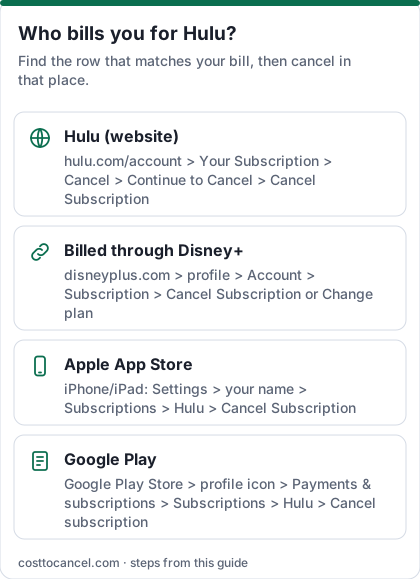
| Who bills you | Where to cancel | Official help |
|---|---|---|
| Hulu directly | Account page > Cancel under Your Subscription > Continue to Cancel > Cancel Subscription | Hulu Help |
| Disney+ (bundle signed up on Disney+) | disneyplus.com > profile > Account > Subscription > Cancel Subscription or Change plan | Hulu Help: manage through Disney+ |
| Apple | iPhone Settings > your name > Subscriptions > Hulu > Cancel Subscription | Apple |
| Google Play | Google Play > Subscriptions > Hulu > Cancel subscription | Google Play Help |
| Other partner (Amazon, Roku, Verizon, Spotify, T-Mobile, Xfinity and others listed on Hulu Help) | Account page > Payment Information shows the partner - cancel with them | Hulu Help: third parties |
Hulu price tiers (October 2026)
| Plan | Price (US) | What you get |
|---|---|---|
| Hulu (With Ads) | $12.49/mo or $124.99/yr | Streaming library with ads |
| Hulu Premium (No Ads) | $21.49/mo | No ads on most titles; downloads; Watch Party |
| Disney+, Hulu Bundle | $12.99/mo with ads or $21.99/mo Premium | Usually cheaper than two standalones |
| Hulu + Live TV, Disney+, ESPN Select | $99.99/mo | Live TV + Hulu with ads + Disney+ with ads + ESPN Select |
| Hulu Premium + Live TV, Disney+ Premium, ESPN Select | $109.99/mo | Live TV + no-ads on-demand on Hulu and Disney+ |
How to cancel Hulu
If Hulu bills you
- Open your Account page in a browser and sign in.
- Under Your Subscription, select Cancel.
- If Hulu offers a pause, select Continue to Cancel.
- Select Cancel Subscription and confirm.
- Check that the status reads that the subscription will be canceled, and keep the confirmation email.
If the bundle was signed up on Disney+
- Go to disneyplus.com > profile > Account.
- Under Subscription, select the plan that includes Hulu.
- Choose Cancel Subscription, or Change plan if you only want to drop Hulu.
If Apple bills you
- Open Settings on your iPhone or iPad and tap your name at the top.
- Tap Subscriptions.
- Tap Hulu.
- Tap Cancel Subscription (or Cancel Free Trial), then confirm.
If Google Play bills you
- On Android, open Subscriptions in Google Play (same Google Account that has the subscription).
- Select Hulu.
- Tap Cancel subscription and follow the instructions.
- Uninstalling the app does not cancel the subscription; you keep access for the time already paid (Google Play Help).
How to know it worked
You're done when:
- The Account page status says your subscription will be canceled (Hulu Help's exact wording).
- You received the confirmation email.
- You are not charged after the current billing cycle ends.
Source: Hulu Help: How to cancel.
If it didn't work
- No Cancel button. A third party or Disney+ bills you - check Payment Information and use that row in the table.
- You paused by mistake. Pausing is not cancelling. Return to Account and cancel, or wait for the pause to end.
- Hulu + Live TV free trial. Hulu Help says those trials end immediately when you cancel.
- You cancelled the original standalone after upgrading to a bundle. The bundle can keep billing - cancel the bundle itself on the account that bills it (Hulu Help).
- Partial-month refund. Hulu Help does not promise refunds for unused days; access runs to the end of the cycle.
What we verified
Verified on official Hulu Help (October 18, 2026): standalone, bundle and Live TV prices and the Sept 23 / Oct 21 increase timing (plans and prices); cancel path Cancel > Continue to Cancel > Cancel Subscription and confirmation status (How to cancel); third-party biller list; pause up to 12 weeks for Hulu-billed subscribers; Live TV free trials ending immediately on cancel; no cancellation fee stated.
Not verified - left out: partner-specific menu labels beyond what Hulu Help names; student-offer fine print beyond the student discount mention on the plans page.
Pause instead of cancelling
Hulu Help says Hulu-billed subscribers may pause for up to 12 weeks. On the cancel flow you will often see pause offered before Continue to Cancel. Pausing is not available for every third-party-billed plan - check your Account page. Source: Hulu Help.
Bundles and existing standalones
If you upgraded into a Disney+/Hulu/ESPN bundle from an older standalone, Hulu Help says cancelling the old standalone does not end the bundle, and cancelling the bundle may leave the original standalone billing. Cancel each plan you no longer want on the account that bills it. Bundles signed up on Disney+ or HBO Max are managed there (Hulu Help).
Frequently asked questions
Can I cancel Hulu and keep Disney+?
Yes if they are separate subscriptions. If they are one bundle, switch to standalone Disney+ instead of cancelling the bundle.
Does Hulu charge a cancellation fee?
Hulu Help's plans page says there are no cancellation fees.
Why is there no Cancel button?
You're billed by a partner. Hulu Help lists Amazon, Apple, Comcast Xfinity, Disney, Google, Kroger, HBO Max, Optimum, Roku, Spotify, T-Mobile and Verizon - cancel with the one shown under Payment Information.
Does pausing cost anything?
Hulu Help does not list a pause fee; you are not charged during the pause for eligible Hulu-billed plans.