How to cancel Adobe Creative Cloud (and avoid the early termination fee)
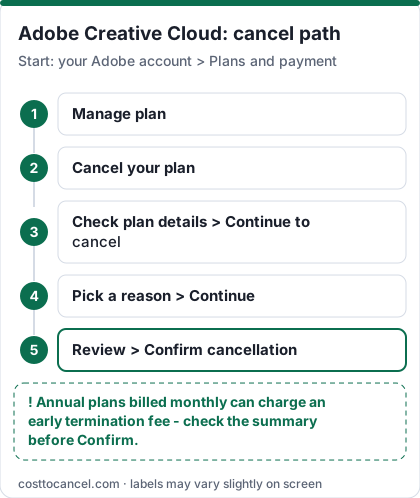
In the US (as of 2026-10-18), Adobe lists Creative Cloud Pro at $69.99/month on an annual plan billed monthly, $104.99/month month-to-month or $779.99/year prepaid (US list prices before tax, from Adobe: Changes to Creative Cloud for individuals plans). To cancel Adobe Creative Cloud bought from Adobe, sign in to your Adobe account, open Plans and payment, select Manage plan > Cancel your plan, then Continue to cancel and Confirm cancellation (Adobe Help: Cancel your Adobe trial or subscription).
Cancel within 14 days of your initial purchase for a full refund. After that, an annual, billed monthly plan charges an early termination fee of 50% of the remaining contract balance (Adobe: subscription terms and refund policies). If Apple, Google or a reseller bills you, cancel with them instead.
Most people are on the "annual, billed monthly" plan without realizing it is a 12-month contract. That contract, not the cancel button, is what makes leaving Adobe expensive - so work out which plan type and which biller you have before you click anything.
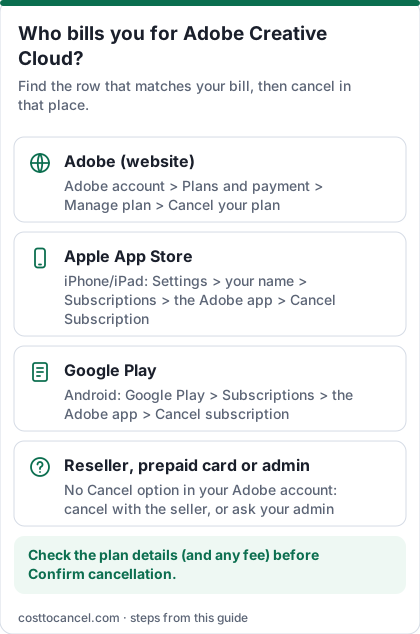
Where to cancel (who bills you)
| Who bills you | Where to cancel | Official help |
|---|---|---|
| Adobe directly (card or PayPal on your Adobe account) | Adobe account > Plans and payment > Manage plan > Cancel your plan | Cancel your Adobe trial or subscription |
| Apple App Store (bought in an Adobe iPhone/iPad app) | iPhone Settings > your name > Subscriptions > the Adobe app > Cancel Subscription | Apple: Cancel a subscription |
| Google Play (bought in an Adobe Android app) | On Android, open Subscriptions in Google Play (or Settings > Google > Manage your Google Account > Payments & subscriptions > Manage subscriptions) > select the Adobe app > Cancel subscription | Google Play: Cancel a subscription |
| Other (reseller, prepaid card, Microsoft Store, school or employer admin) | Cancel with the company that sold it, or ask your admin to remove your seat | Adobe says third-party purchases follow that provider's process (Adobe Help) |
Creative Cloud Pro and Standard US prices (verified October 2026)
| Plan | Price (US) | What you get |
|---|---|---|
| Creative Cloud Pro - annual, billed monthly | $69.99/mo | 20+ desktop apps, 12-month commitment |
| Creative Cloud Pro - month-to-month | $104.99/mo | No annual commitment |
| Creative Cloud Pro - annual, prepaid | $779.99/yr | Paid upfront, no refund after 14 days |
| Creative Cloud Standard - annual, billed monthly | $54.99/mo | Same desktop apps, limited generative AI |
| Creative Cloud Standard - month-to-month / prepaid | $82.49/mo / $599.88/yr | Not available on student plans |
| Single-app, Photography and other plans | Check official pricing | Not shown on the page we verified |
How to cancel Adobe Creative Cloud
If you bought from Adobe (web)
- Sign in to your Adobe account at account.adobe.com.
- In Plans and payment, select Manage plan for the plan you want to cancel.
- Select Cancel your plan. If the button is missing, see the routing table above - the plan is billed by someone else.
- Check the plan details (including any cancellation fee shown) and select Continue to cancel.
- Choose a reason, select Continue, review the cancellation details and select Confirm cancellation.
- Repeat for every other plan: Adobe says each plan must be cancelled separately (Adobe Help).
If Apple bills you (bought in an Adobe iPhone or iPad app)
- Open Settings on your iPhone or iPad and tap your name at the top.
- Tap Subscriptions.
- Tap the Adobe app (for example Photoshop or Lightroom).
- Tap Cancel Subscription (or Cancel Free Trial), then confirm.
If Google Play bills you (bought in an Adobe Android app)
- On Android, open Subscriptions in Google Play (same Google Account that has the subscription).
- Select the Adobe app.
- Tap Cancel subscription and follow the instructions.
- Uninstalling the app does not cancel the subscription; you keep access for the time already paid (Google Play Help).
How to know it worked
You're done when all three of these are true:
- Adobe sends a cancellation confirmation email to the address on your Adobe account.
- The plan card in your Adobe account shows the plan as cancelled, with the date paid access ends.
- No other plan is still listed as active - cancelling one plan does not cancel the others.
Access to paid apps continues until the end of the current billing period; after that your account converts to a free Creative Cloud membership (Adobe Help). For an App Store or Google Play purchase, the proof is the subscription showing as cancelled (with an end date) in that store, not in Adobe.
If it didn't work
- "Cancel your plan" isn't there or fails. Adobe says you can't cancel while a payment is processing or has a problem - wait 24 hours and try again. If there's still no option, the plan is billed by Apple, Google, a reseller or an admin (see the table above).
- No confirmation email. Adobe's billing help says the cancellation may not have gone through - check the plan status in your Adobe account (Adobe: Understand billing charges).
- You were charged after cancelling. That's usually the final charge for the current billing period, a second active plan, or the early termination fee on an annual, billed monthly plan. Adobe says approved refunds take 10-14 business days to reach your payment method.
- The fee looks wrong. Ask Adobe support through chat to show the calculation. Before cancelling, compare switching to a cheaper paid plan - Adobe says it doesn't charge a cancellation fee for changing to another paid plan.
- You changed your mind. Within the billing period you can reactivate from your Adobe account and keep your apps and storage.
What we verified
Verified on official Adobe pages (October 18, 2026): the cancel path and button labels; the separate-cancellation rule for multiple plans; the 24-hour wait when a payment is processing; access until the end of the billing period; the 14-day full-refund window; the 50% early termination fee on annual, billed monthly plans; no refund after 14 days on prepaid and month-to-month plans; the 5 GB free storage limit and 30 days to move files; Pro and Standard US prices.
Not verified - left out or flagged: single-app, Photography and student renewal prices beyond those shown above; whether a fee applies when you cancel right after an annual renewal (check the fee shown on the cancel screen); retention offers (Adobe shows these case by case, so we don't promise any). Teams and enterprise plans are out of scope.
How the early termination fee works
| When you cancel | Annual, billed monthly | Annual, prepaid | Month-to-month |
|---|---|---|---|
| Within 14 days of initial purchase | Full refund | Full refund | Full refund |
| After 14 days | Fee of 50% of the remaining contract balance; service continues to end of that month's billing period | No refund; service continues to end of the contract term | No refund; service continues to end of that month's billing period |
Source: Adobe: subscription terms and refund policies (US terms). Adobe's own example: cancel in the ninth month and you pay 50% of the three remaining monthly fees. On the $69.99 Pro plan with 6 months left, that is roughly 50% x 6 x $69.99 = about $210 (our arithmetic, before tax).
How to reduce the fee
- Cancel inside the 14-day window if you just bought the plan.
- Switch to a cheaper paid plan (for example Standard or a single app) instead of cancelling. Adobe states it doesn't charge a cancellation fee for changing to another paid plan.
- Ride out the contract if only a month or two remain - the fee on a short remainder can be smaller than the hassle.
- Check the fee on screen before you confirm; Adobe shows plan details before the final step.
What happens to your files
Files saved on your computer stay there. After cancelling, your account becomes a free Creative Cloud membership with a 5 GB cloud storage limit; if you're over it, Adobe gives you 30 days to move files out of cloud storage (Adobe terms). Download cloud documents before the end date.
Alternatives
Affinity, Photopea (browser), DaVinci Resolve (video), GIMP and Inkscape cover most single-app needs. Canva handles quick social graphics.
Frequently asked questions
Can I cancel Adobe without paying the fee?
Yes if you cancel within 14 days of your initial purchase, or if you're on a month-to-month or prepaid plan (no fee, but no refund after 14 days). Switching to another paid plan also has no cancellation fee, according to Adobe.
Why did Adobe charge me after I cancelled?
Usually the final charge for the current billing period, another plan that is still active, or the early termination fee on an annual, billed monthly plan.
Does Adobe charge a fee to cancel a monthly plan?
No cancellation fee on a month-to-month plan, but after 14 days that month's payment isn't refunded; access continues to the end of the billing month.
Is the student plan different?
Student and teacher plans are annual contracts with their own prices (Adobe lists $19.99/month for the first year and $39.99/month at renewal, billed monthly, US). The same subscription terms apply.