How to cancel Planet Fitness (2026): online, in person or by mail
In the US (as of 2026-10-18), Planet Fitness advertises memberships starting at $15 (Planet Fitness: Memberships); your exact dues, annual fee and any commitment are set out in your membership agreement and member portal. To cancel Planet Fitness, log in to the member portal at planetfitness.com, visit your home club in person, or mail written notice to your home club - and make sure the club receives it at least 8 days before your next billing date (Planet Fitness Customer Service FAQ).
The same 8-day rule applies to the annual fee date. If your membership has a minimum term and you end it early, Planet Fitness says a $58 buyout fee is required; No Commitment memberships can be cancelled at any time without a fee.
Planet Fitness is a franchise, so your home club - the one where you joined - runs your membership and your billing. Every cancel route ends up there. The one number that matters most is 8 days: that's how far ahead of your billing date (and your annual fee date) the club needs your request.
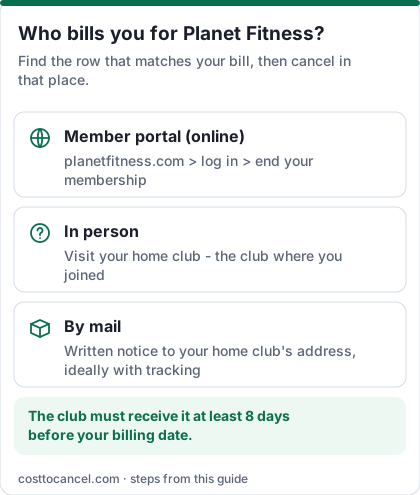
Ways to cancel (your home club bills you)
| Who bills you | Where to cancel | Official help |
|---|---|---|
| Home club - member portal (online) | Log in to your account at planetfitness.com and end your membership in the member portal | Planet Fitness FAQ: How do I manage my membership? |
| Home club - in person | Visit the club where you joined during staffed hours | Planet Fitness FAQ |
| Home club - by mail | Send written notification to your home club's address requesting to end your membership | Planet Fitness FAQ |
Planet Fitness costs (verified October 2026)
| Plan | Price (US) | What you get |
|---|---|---|
| Classic | Starting at $15/mo (advertised) | Unlimited access to your home club |
| PF Black Card | Check your club's price | Any Planet Fitness worldwide, bring a guest anytime, Black Card perks |
| Annual fee | See your agreement / member portal | Billed on the annual fee date in your agreement |
| Buyout fee | $58 | Only if a minimum-term membership ends before the term |
How to cancel Planet Fitness
Before you start: find your two dates
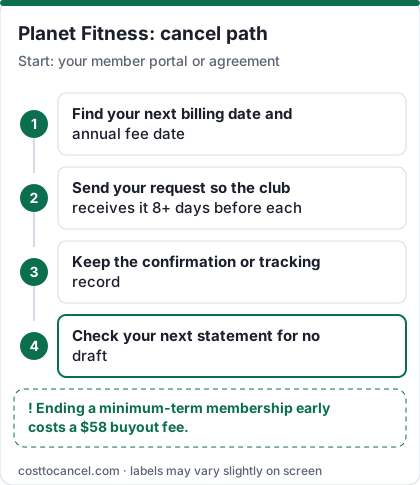
- Log in to the member portal at planetfitness.com (or open the PF App) and go to My Billing Info & Balance.
- Note your next billing date and your annual fee date (also in your membership agreement).
- Count back 8 days from each - your request must reach the club by then.
Online (member portal)
- Log in to your account in the member portal on planetfitness.com.
- Follow the option to end your membership.
- Save the confirmation (email or screenshot) showing the date.
In person
- Go to your home club during staffed hours.
- Tell the front desk you want to end your membership.
- Ask for written or emailed confirmation, including whether the annual fee is stopped too.
By mail
- Write a short, signed letter requesting to end your membership, with your full name, contact details and membership or PF Club Pass number.
- Mail it to your home club's address, ideally with tracking so you can prove when it arrived.
- Allow for delivery time: the club must receive it at least 8 days before your billing date.
How to know it worked
You're done when:
- You have a dated confirmation from the club or the member portal.
- Your member portal no longer shows an upcoming monthly draft (billing changes can take up to 7 days to take effect, Planet Fitness says).
- Your next bank statement after the billing date shows no Planet Fitness draft, and no annual fee on the annual fee date.
If it didn't work
- You were billed after cancelling. If the club received your request less than 8 days before the billing date, Planet Fitness says that draft can still go through. Check your confirmation date against the billing date, then contact the home club with your proof.
- You were charged a buyout fee. That's the $58 fee for ending a minimum-term membership early. Check the commitment length in your agreement.
- The annual fee hit after cancelling. The request must reach the club at least 8 days before the annual fee date as well.
- The status shows "draft pending". A payment is already processing; Planet Fitness says you can't make an online payment while a draft is pending - wait or visit the club.
- The home club is closed. Contact Planet Fitness Member Services (Mon-Fri, 9 am - 6 pm ET).
- Still stuck. Keep your confirmation or tracking record and dispute the charge with your bank if the club won't fix it.
What we verified
Verified on official Planet Fitness pages (October 18, 2026): the three ways to end a membership (mail, in person, member portal); the 8-day notice rule for monthly billing and the annual fee; billing changes taking up to 7 days; the $58 buyout fee for minimum-term memberships ended early; No Commitment memberships cancellable at any time without a fee; Black Card vs Classic access; "starting at $15"; Member Services hours.
Not verified - left out: exact PF Black Card dues, annual fee and startup fee amounts (they vary by club); state-specific cancellation laws; freeze options; whether phone cancellation is accepted (Planet Fitness doesn't list it).
Your timing, worked out
| What you want to stop | When the club must receive your request |
|---|---|
| Next monthly draft | At least 8 days before the next billing date |
| Annual fee | At least 8 days before the annual fee date |
| Minimum-term membership, ending early | Any time, but a $58 buyout fee applies |
| No Commitment membership | Any time, no fee |
Source: Planet Fitness Customer Service FAQ. Mailed letters count from the day the club receives them, not the day you post them.
Transferring instead of cancelling
If you're moving rather than quitting, Planet Fitness lets eligible members transfer online. Planet Fitness lists these conditions: you're not a minor, you've been a member for at least 90 days, you haven't transferred in the past 90 days, you owe nothing at your current club, and your membership is billed monthly. Otherwise, contact your home club (Planet Fitness FAQ).
Cheaper or more flexible alternatives
Community recreation centers, YMCA financial-assistance rates and pay-as-you-go passes are worth comparing. Some health insurance plans include gym programs - check your plan's member benefits.
Frequently asked questions
Can I cancel Planet Fitness online?
Yes. Planet Fitness lists logging into your account through the member portal on its website as one of the ways to end your membership, alongside visiting or mailing your home club.
Can I cancel at any Planet Fitness location?
Planet Fitness's in-person and mail options both go through your home club - the club where you joined.
Does Planet Fitness charge a cancellation fee?
Only for memberships with a minimum term ended early: a $58 buyout fee. No Commitment memberships can be cancelled at any time without paying a fee.
How far in advance do I need to cancel?
The club must receive your request at least 8 days before your next billing date (and before your annual fee date) for that charge to stop.