How to cancel DoorDash DashPass (October 2026)
In the US (as of 2026-10-18), DoorDash lists DashPass at $9.99/month or $96/year (plus tax) on its About Us / FAQ, and you must cancel at least 24 hours before your next scheduled payment to avoid the next charge. To cancel, open the DoorDash app or doordash.com, tap the account icon, go to Manage DashPass, tap Cancel Membership, choose a reason and confirm with Cancel DashPass (DoorDash Help: How do I cancel my DashPass subscription?).
Paid members keep benefits until the end of the billing period - but if you cancel during a free trial, DoorDash ends your benefits immediately.
- What DashPass costs (October 2026)
- Cancel or pause DashPass
- How you got DashPass decides what happens next
- Our take: on a free trial, cancel on the last day, not the first
- Is DashPass paying for itself?
- Refunds and charges after cancelling
- Student DashPass and family sharing
- Receipt math example
- Find the other memberships hiding on your card
- FAQ
DashPass is DoorDash's membership for $0 delivery fees and reduced service fees on eligible orders. It's easy to end up with it without a deliberate decision: through a free trial at checkout, a student offer, a family share, or a credit card perk that quietly converts to paid. The cancel button is simple; the timing rules are where people lose money.
What DashPass costs (October 2026)
| Plan | Price (US) | What you get |
|---|---|---|
| DashPass monthly | $9.99/mo | $0 delivery fees and lower service fees on eligible orders (plus tax) |
| DashPass annual | $96/yr | About $8/mo paid upfront (plus tax) |
| Student DashPass | $4.99/mo or $48/yr | After SheerID verification; outside the Aug 17–Oct 12, 2026 free-student window |
| Annual plan after a DoorDash Rewards Mastercard free year | $96/year | Auto-enrolls after the 12 free months unless cancelled |
| Free trial | Free for the trial period | Converts to the plan you chose at sign-up |
Cancel or pause DashPass
DoorDash app or doordash.com
- Open the DoorDash app or go to doordash.com and sign in.
- Tap the account icon.
- Go to Manage DashPass.
- Tap Cancel Membership, choose a reason and tap Select reason.
- Tap Cancel DashPass, then Got it. DoorDash emails a confirmation.
Pause instead of cancelling
- On the same Manage DashPass page, choose Pause Membership.
- Confirm with Pause DashPass in the pop-up.
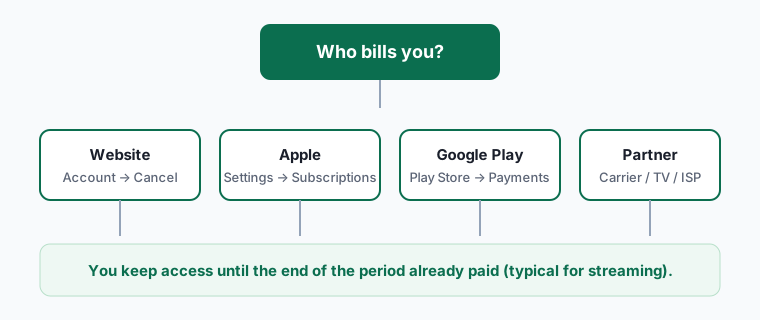
iPhone or iPad (only if Apple bills you)
- Open Settings on your iPhone or iPad and tap your name at the top.
- Tap Subscriptions.
- Tap DoorDash.
- Tap Cancel Subscription (or Cancel Free Trial), then confirm.
- Only use the iPhone steps if you subscribed through the App Store (the charge on your statement says APPLE.COM/BILL).
Android (only if Google Play bills you)
- Open the Google Play Store app and tap your profile icon (top right).
- Tap Payments & subscriptions > Subscriptions.
- Select DoorDash.
- Tap Cancel subscription, pick a reason and confirm.
- Only use the Android steps if you pay through Google Play (the charge says GOOGLE *service name).
How you got DashPass decides what happens next
| How DashPass started | What cancelling does | Watch out for |
|---|---|---|
| Paid monthly or annual plan | Benefits continue to the end of the billing period | Cancel 24+ hours before the next payment |
| Free trial | Benefits end immediately | Trials auto-enroll into the plan you picked at sign-up |
| DoorDash Rewards Mastercard (12 free months) | Ends the membership; DoorDash says you can re-enroll during the free period | Auto-renews into the paid annual plan at $96/year after 12 months |
| Student DashPass | Ends the membership | Eligibility rules are on DoorDash's student FAQ |
| Shared through DashPass Family Sharing | The owner's cancellation ends sharing | Ask the account owner, not DoorDash |
| Paid through Apple or Google | Must be cancelled in that store | The DoorDash button may not appear |
Our take: on a free trial, cancel on the last day, not the first
For most subscriptions we tell readers to cancel a free trial the day they start it and keep using it until the end. DashPass is the exception. DoorDash's help center says cancelling during a free period terminates the benefits immediately, so cancelling on day one throws away the rest of the trial.
Instead, set a phone reminder for two days before the trial ends - DoorDash requires 24 hours' notice before a scheduled payment - and cancel then. For the card-provided free year, DoorDash says it reminds you before renewal, but don't rely on an email that may land in a promotions folder; put the date in your calendar when you activate the card.
Is DashPass paying for itself?
Open Orders in the app and look at last month's receipts. For each order, note the delivery fee DoorDash would have charged without DashPass and any service fee discount. If the total savings are below the membership price, cancel. If you also pay for Uber One, compare which app you actually used - paying for two delivery memberships is rarely worth it. Amazon Prime members should also check what Prime currently includes, since Amazon has bundled delivery-app perks before.
Refunds and charges after cancelling
DoorDash's help article doesn't promise refunds for a period you've already started; the stated rule is that benefits continue to the end of the billing period. If you're charged after you cancelled more than 24 hours before the payment date, contact DoorDash support from Help in the app with your confirmation email. App Store or Google Play charges are refunded only by Apple or Google - see our subscription refund guide.
Student DashPass and family sharing
DoorDash maintains separate help articles for student DashPass and family sharing. After SheerID verification, DoorDash lists Student DashPass at $4.99/month or $48/year (versus standard $9.99/$96). A separate free student year ran August 17–October 12, 2026 for US/Canada - that signup window has closed; check the student help page if DoorDash opens another. The cancel button is still under Manage DashPass, but the person who owns the paid plan is the one who can end it. If you only receive shared benefits, ask the owner - cancelling from a shared profile may not be available.
Students should also watch the end of any free student period: when eligibility ends, DoorDash can move the account onto a standard paid plan. Treat that date like a free trial end date and cancel 24+ hours ahead if you do not want to pay.
Receipt math example
Suppose your last four DoorDash orders showed delivery fees of $4.99, $5.99, $0 (promo) and $6.99. That is about $18 in delivery fees you would have paid without DashPass. If Manage DashPass shows a membership price below that and you order at a similar pace next month, keep it; if you only ordered twice and one was already $0 delivery, cancel. Do the same for service-fee discounts if your receipts itemise them - Delivery fee is the cleanest line to sum.
Find the other memberships hiding on your card
DashPass is often one of several small food and shopping memberships that renew quietly. Our guide to finding every subscription walks through bank statements, Apple, Google, PayPal and Amazon in about 15 minutes, and our free trial tips cover how to set reminders that actually work.
Frequently asked questions
How much is DashPass?
In the US as of 2026-10-18, DoorDash lists $9.99/month or $96/year (plus tax) on its About Us FAQ. Eligible students pay $4.99/month or $48/year after verification.
How do I cancel DashPass?
In the DoorDash app or on doordash.com: account icon > Manage DashPass > Cancel Membership > choose a reason > Cancel DashPass.
How late can I cancel before being charged?
DoorDash says at least 24 hours before your next scheduled payment.
If I cancel my free trial, do I keep DashPass until it ends?
No. DoorDash ends benefits immediately when you cancel during a free period.
Can I pause DashPass instead?
Yes. Manage DashPass has a Pause Membership option.
Does deleting the DoorDash app cancel DashPass?
No. Cancel in Manage DashPass, or in the App Store or Google Play if they bill you.